> ## Documentation Index
> Fetch the complete documentation index at: https://docs.hub2.io/llms.txt
> Use this file to discover all available pages before exploring further.
# API keys
## Introduction
API keys are used as the main authentication mechanism for the HUB2 API, therefore it's really important to understand what they are and how to use them.
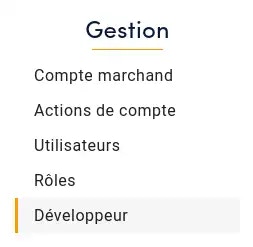
API Key management is accessible on the [HUB2 Dashboard](https://dashboard.hub2.io), in the "Developer" section, as illustrated below:
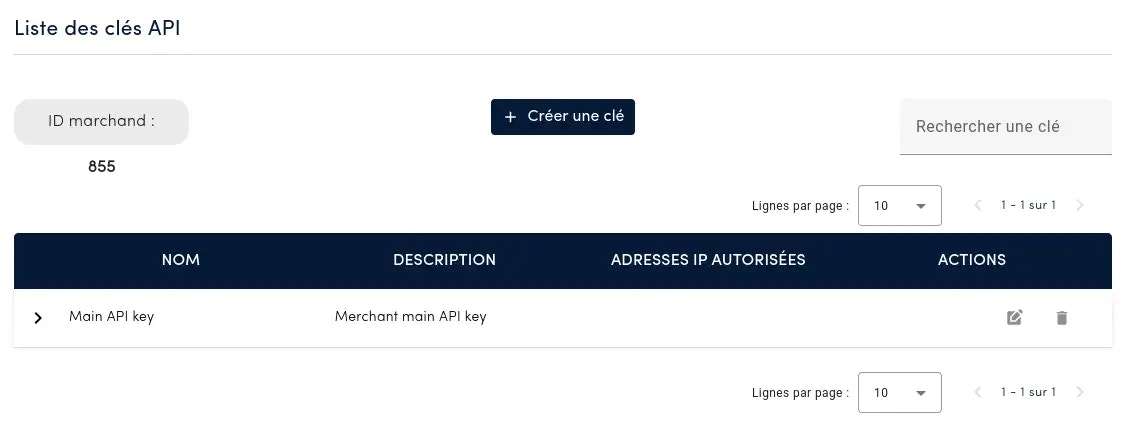
 The following screenshot shows the list of existing keys:
 ## Keys management
### Creating a key
The API key is only visible when it is created and **can no longer be consulted after this stage**, for security reasons.
Click on the "**Create a key**" button to access the following window:
## Keys management
### Creating a key
The API key is only visible when it is created and **can no longer be consulted after this stage**, for security reasons.
Click on the "**Create a key**" button to access the following window:
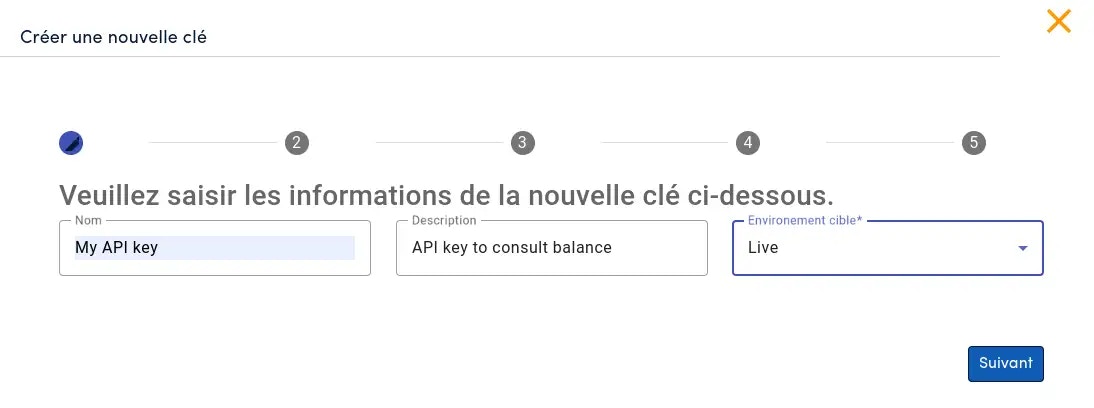 * (Optional) Enter a **name** and a **description** for the new key.
* The parameter **`environment`** (*sandbox* or *live*) is required. The new key will be restricted to this environment. [Read more about environments.](#environment)
* (Optional) Enter a **name** and a **description** for the new key.
* The parameter **`environment`** (*sandbox* or *live*) is required. The new key will be restricted to this environment. [Read more about environments.](#environment)
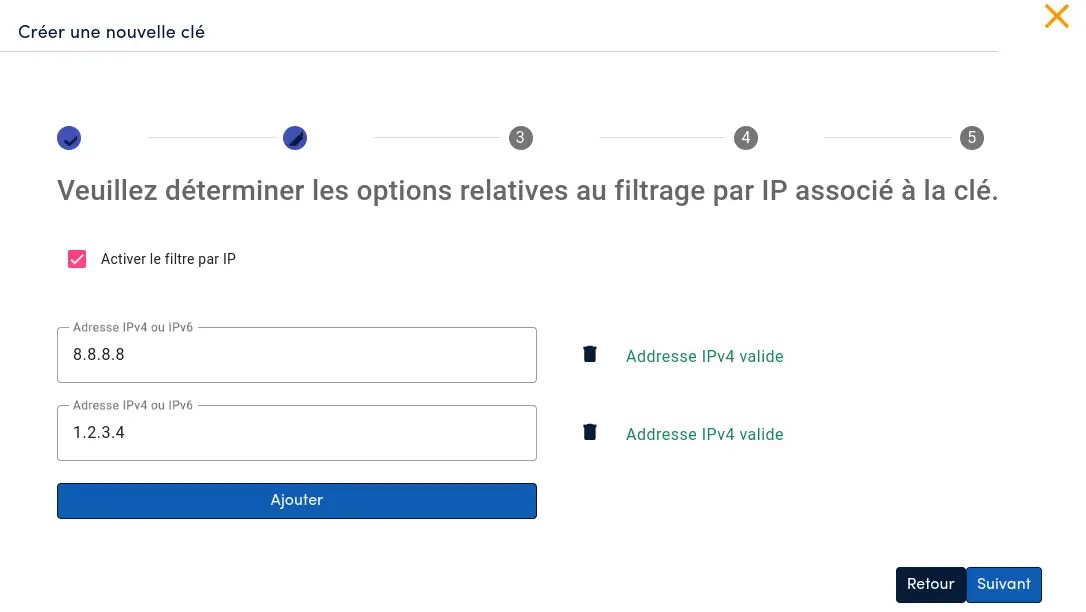 In this section, it's possible to restrict which originating IP addresses can use the newly created API key.
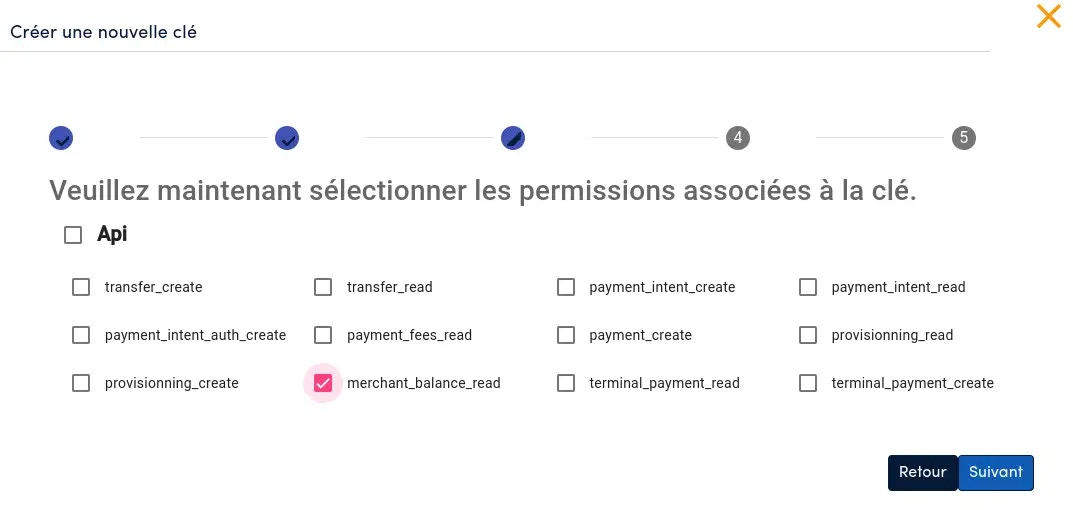 Permissions of the new API key can be set here.
Permissions set on an API key allows the segregation of responsibilities and advanced configuration. This section allows a merchant to use different API keys, whether its software has several components, each with a different role, or not.
Permissions of the new API key can be set here.
Permissions set on an API key allows the segregation of responsibilities and advanced configuration. This section allows a merchant to use different API keys, whether its software has several components, each with a different role, or not.
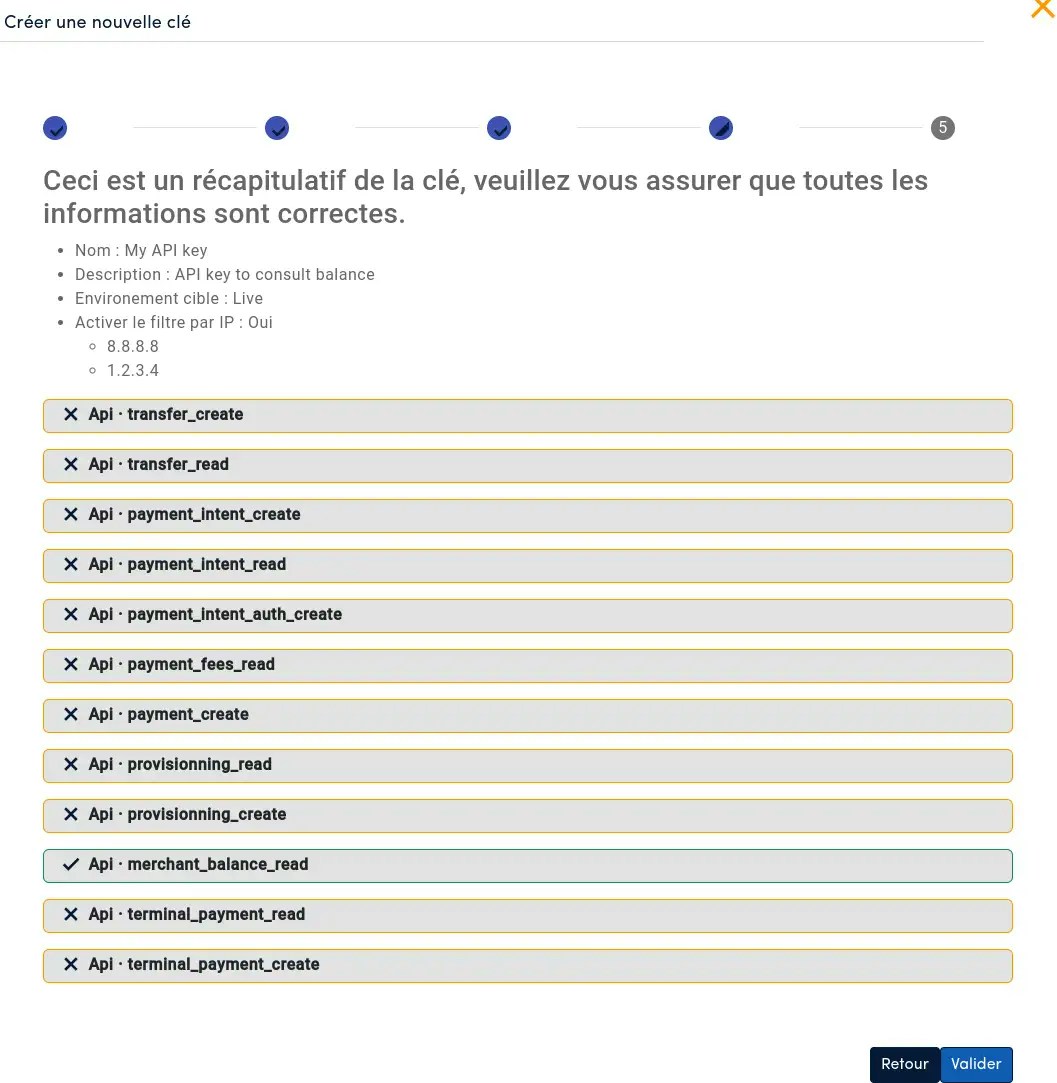 On the summary page, review the settings for the new API key, and then, click *Validate*.
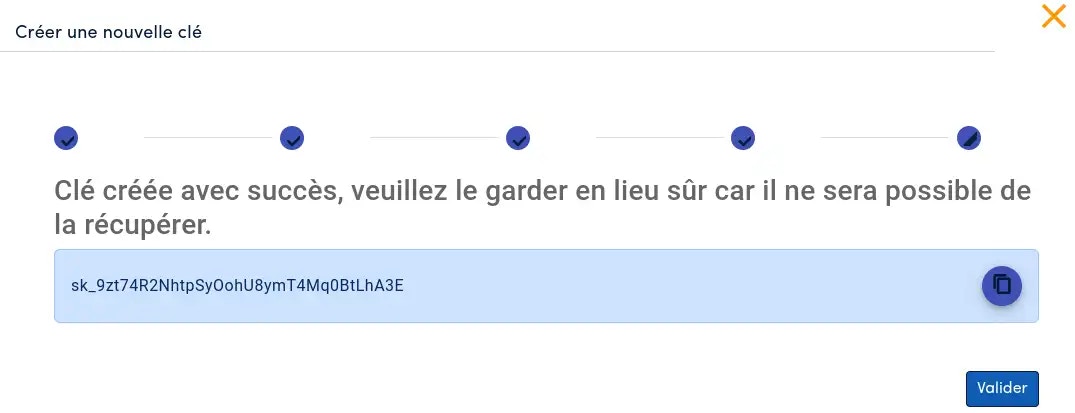
The API key is only displayed once. Save it now in a secure vault. It will not be accessible later.
On the summary page, review the settings for the new API key, and then, click *Validate*.
The API key is only displayed once. Save it now in a secure vault. It will not be accessible later.
 ### Editing a key
On each API key row, in the "Actions" column, an *Edit* button is available to change the settings of a key. This edition process is the same as the creation process, except that you will not be able to view the key. **Every setting can be edited**.
Changes to permissions and IP address restrictions are taken into account as soon as they are modified. Special attention is required before committing changes.
### Deleting a key
In the "Actions" column, a *Delete* button is available to delete a key.
Deleting a key is irreversible. HTTP traffic using the deleted key will be stopped immediately after deletion.
## Using the keys
In the [API reference](/api-reference), the endpoints requiring authentication by merchant ID and API key are listed. For these endpoints, HTTP headers must be configured in the HTTP request to identify and authenticate the emitter.
## API key configuration
### Environment
* `sandbox`: This is a closed environment for integration testing. No traffic or real world transactions will be created if the API key used is set to the `sandbox` environment. Provider behaviour is simulated by HUB2. Also, the transfer and collection accounts used for `sandbox` transactions will be the `sandbox` accounts.
* `live` : *NB: Requires GO LIVE and an integration review by HUB2 before traffic can be sent in a `live` (real world) environment*. This is the real world environment, a key in this environment allows real traffic to be processed and providers will be contacted if the transaction endpoints are called.
[More on transfer and collection accounts.](/integration/en/getting_started/api_operation#accounts)
### IP address restriction
IP address restriction is an optional feature available to merchants to further secure exchanges between the merchant platform and HUB2.
When an IP address restriction has been set on an API key, HUB2 checks that the IP address originating the HTTP request is authorized to use the API key it contains.
### Permissions
Configurable permissions per API key allows merchants to create multiple keys with different permissions, so that each key has a different responsibility.
The full list of permissions and their description is as follows:
| Permission | Description | |
| :------------------------------- | :-------------------------------------------------------------------------------------------------------------------------- | - |
| `Api.transfer_create` | Allows the creation of transfers | |
| `Api.transfer_read` | Allows the reading of transfers | |
| `Api.payment_intent_create` | Allows the creation of payment intents | |
| `Api.payment_intent_read` | Allows the reading of payment intents | |
| `Api.payment_intent_auth_create` | Allows the authentication of a payment | |
| `Api.payment_fees_read` | Allows the reading of payment fees | |
| `Api.payment_create` | Allows the creation of a payment in a payment intent | |
| `Api.provisioning_read` | Allows the reading of provisioning requests | |
| `Api.provisioning_create` | Allows the creation of a provisioning request | |
| `Api.merchant_balance_read` | Allows the reading of transfer and collection accounts balance | |
| `Api.terminal_payment_create` | Allows the creation of payments to be made via payment terminal | |
| `Api.terminal_payment_read` | Allows the reading of payments made via payment terminal | |
| `Api.kyb_read` | Allows the reading of [kyb](/documentation/en/glossary#kyb) / [kyb-transaction](/documentation/en/glossary#kyb-transaction) | |
| `Api.kyb_update` | Allows the update of kyb | |
| `Api.kyb_delete` | Allows the deletion of kyb / kyb-transaction | |
| `Api.kyb_create` | Allows the creation of kyb / kyb-transaction | |
## Good practices
### Security
A good security practice is to **renew API keys on a regular basis**. If a key has been inadvertently disclosed to a third party, or stolen by a malicious third party, deleting the keys concerned and recreating new ones can limit the impact on a merchant's business.
**Disclaimer**: The merchant is responsible for the manner in which the API Key has been securely stored on its platform. HUB2 cannot be held responsible for the processing of illegitimate traffic associated with a Merchant API Key that has been stolen or disclosed.
### Editing a key
On each API key row, in the "Actions" column, an *Edit* button is available to change the settings of a key. This edition process is the same as the creation process, except that you will not be able to view the key. **Every setting can be edited**.
Changes to permissions and IP address restrictions are taken into account as soon as they are modified. Special attention is required before committing changes.
### Deleting a key
In the "Actions" column, a *Delete* button is available to delete a key.
Deleting a key is irreversible. HTTP traffic using the deleted key will be stopped immediately after deletion.
## Using the keys
In the [API reference](/api-reference), the endpoints requiring authentication by merchant ID and API key are listed. For these endpoints, HTTP headers must be configured in the HTTP request to identify and authenticate the emitter.
## API key configuration
### Environment
* `sandbox`: This is a closed environment for integration testing. No traffic or real world transactions will be created if the API key used is set to the `sandbox` environment. Provider behaviour is simulated by HUB2. Also, the transfer and collection accounts used for `sandbox` transactions will be the `sandbox` accounts.
* `live` : *NB: Requires GO LIVE and an integration review by HUB2 before traffic can be sent in a `live` (real world) environment*. This is the real world environment, a key in this environment allows real traffic to be processed and providers will be contacted if the transaction endpoints are called.
[More on transfer and collection accounts.](/integration/en/getting_started/api_operation#accounts)
### IP address restriction
IP address restriction is an optional feature available to merchants to further secure exchanges between the merchant platform and HUB2.
When an IP address restriction has been set on an API key, HUB2 checks that the IP address originating the HTTP request is authorized to use the API key it contains.
### Permissions
Configurable permissions per API key allows merchants to create multiple keys with different permissions, so that each key has a different responsibility.
The full list of permissions and their description is as follows:
| Permission | Description | |
| :------------------------------- | :-------------------------------------------------------------------------------------------------------------------------- | - |
| `Api.transfer_create` | Allows the creation of transfers | |
| `Api.transfer_read` | Allows the reading of transfers | |
| `Api.payment_intent_create` | Allows the creation of payment intents | |
| `Api.payment_intent_read` | Allows the reading of payment intents | |
| `Api.payment_intent_auth_create` | Allows the authentication of a payment | |
| `Api.payment_fees_read` | Allows the reading of payment fees | |
| `Api.payment_create` | Allows the creation of a payment in a payment intent | |
| `Api.provisioning_read` | Allows the reading of provisioning requests | |
| `Api.provisioning_create` | Allows the creation of a provisioning request | |
| `Api.merchant_balance_read` | Allows the reading of transfer and collection accounts balance | |
| `Api.terminal_payment_create` | Allows the creation of payments to be made via payment terminal | |
| `Api.terminal_payment_read` | Allows the reading of payments made via payment terminal | |
| `Api.kyb_read` | Allows the reading of [kyb](/documentation/en/glossary#kyb) / [kyb-transaction](/documentation/en/glossary#kyb-transaction) | |
| `Api.kyb_update` | Allows the update of kyb | |
| `Api.kyb_delete` | Allows the deletion of kyb / kyb-transaction | |
| `Api.kyb_create` | Allows the creation of kyb / kyb-transaction | |
## Good practices
### Security
A good security practice is to **renew API keys on a regular basis**. If a key has been inadvertently disclosed to a third party, or stolen by a malicious third party, deleting the keys concerned and recreating new ones can limit the impact on a merchant's business.
**Disclaimer**: The merchant is responsible for the manner in which the API Key has been securely stored on its platform. HUB2 cannot be held responsible for the processing of illegitimate traffic associated with a Merchant API Key that has been stolen or disclosed.