
Security considerations
Security is essential for online financial transactions.Integration
To keep exchanges between the merchant and HUB2 confidential, and to ensure that only the merchant initiates transactions (and therefore sets their amount and other properties), the API must only be integrated on the server side. Sensitive data, such as API keys, must never be exposed, whether on a website or in a mobile application. Keeping API keys and sensitive information off the client side, and performing transactions on the server side, considerably reduces the risk of attacks such as client-side data manipulation.CORS
To prevent client-side integrations, the HUB2 API cannot be called from the end customer’s browser. The API does not return cross-origin resource sharing (CORS) headers, so browsers block cross-origin requests to it.Signature
An optional payload signature mechanism strengthens the security and integrity of API interactions. It lets merchants cryptographically sign the JSON request body sent to the API. Verifying this signature ensures that the data has not been tampered with in transit and comes from a trusted source. See the integration page to learn how to use it.Platform security mechanisms
Several security components protect the HUB2 platform at different levels. At the perimeter, a Web Application Firewall (WAF) analyzes every HTTP request before forwarding it. Its role is to detect and block malicious HTTP requests before they reach the application. Rejected requests receive the following response: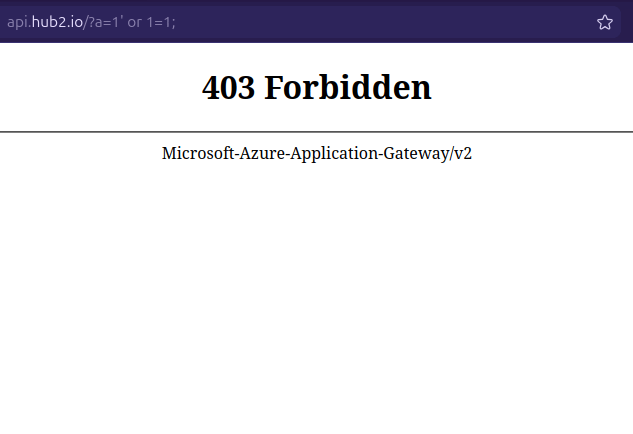
WAF behavior
Here, an SQL injection (SQLi) attack is simulated on the HUB2 API.
The web application firewall immediately rejects the request and returns a response with the status
The web application firewall immediately rejects the request and returns a response with the status
HTTP 403 Forbidden.Troubleshooting common HTTP 403 Forbidden errors
If a legitimate request receives an HTTP 403 Forbidden response, first check that your integration follows the guidelines below.
If your request is still rejected after applying these guidelines, contact HUB2 Support.
1. GET HTTP request with a body
GETrequests must NOT include a body. The HUB2 security gateway rejects all non-compliant requests.- The
Content-Lengthheader is not required for aGETrequest. If included, it must be set to0and the body must be empty.
Bad practice
Bad practice
Notice the See the Good practice below to fix this.
Content-Type and Content-Length headers, and the body, sent with a GET request. Such requests are rejected. Good practice
Good practice
To avoid triggering the security gateway:
- Remove the body entirely.
- Remove the
Content-TypeandContent-Lengthheaders (Content-Lengthis usually computed automatically by your HTTP client library, so there is generally nothing to configure).
2. Non-stringified JSON body
All HTTPPOST requests using application/json must send the JSON stringified as a single line of text. The HUB2 security gateway rejects multi-line JSON payloads: line breaks (CR/LF) or spaces outside the values themselves can trigger filtering rules.
For example:
Bad practice
Bad practice
Notice the multi-line JSON object in the body below:See the Good practice below to fix this.
Good practice
Good practice
To avoid triggering the security gateway, send the body as a single line of text:
3. Body that does not match the Content-Type header
The HUB2 API only accepts JSON payloads. If a request sends valid JSON but sets the Content-Type header to another value (for example text/plain, text/xml or application/x-www-form-urlencoded), the security gateway parses it incorrectly and blocks the request.
For example:
Bad practice
Bad practice
Notice the incorrect See the Good practice below to fix this.
Content-Type header given the JSON payload:Good practice
Good practice
Always set the
Content-Type header to match the format of the body: